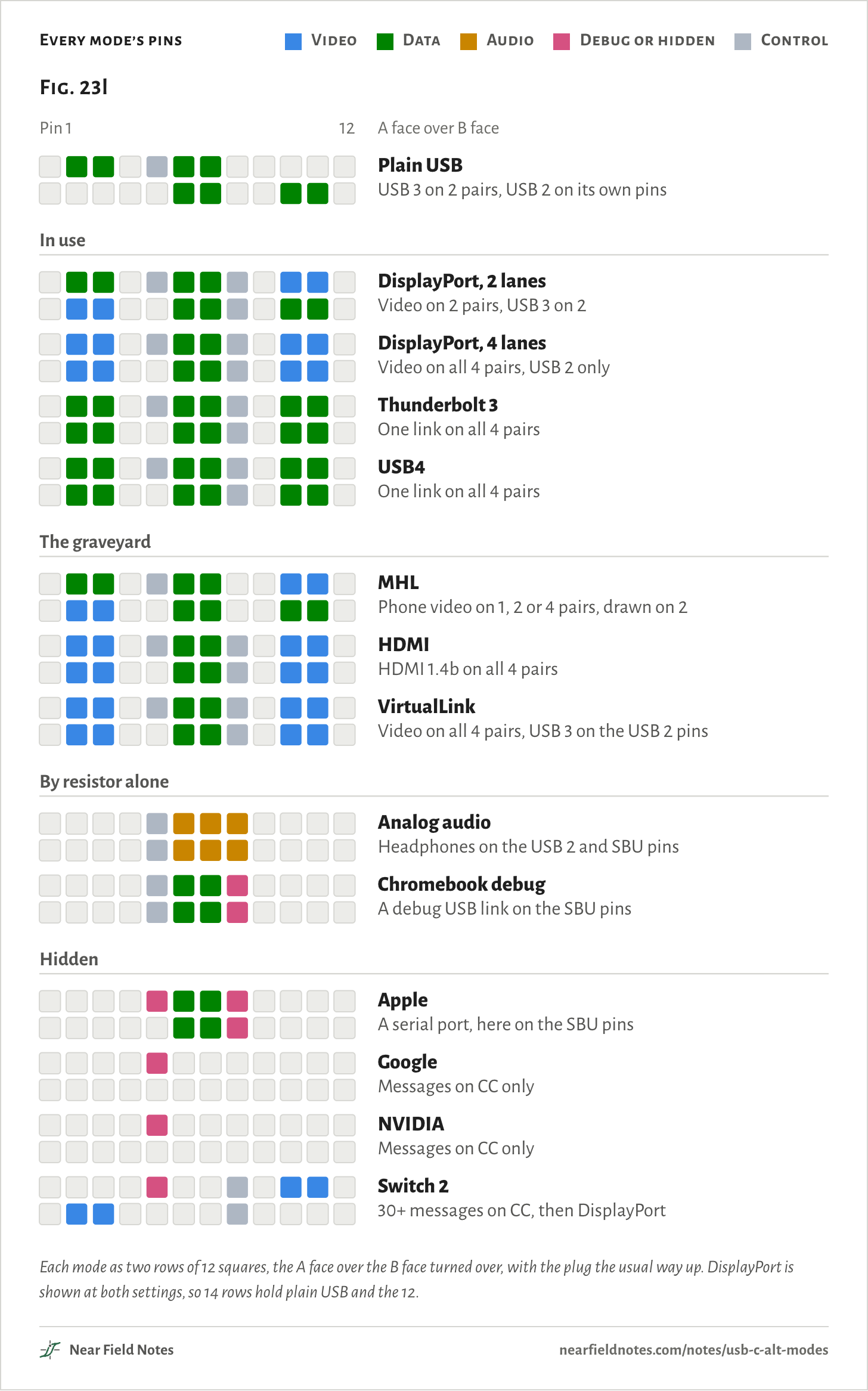
Video, PCIe, headphones and debug links, in at least 12 ways besides plain USB. Most are agreed first in messages on CC, the configuration channel pin. Three are in wide use, three never caught on, two need only resistors, and four are vendors’ hidden modes.
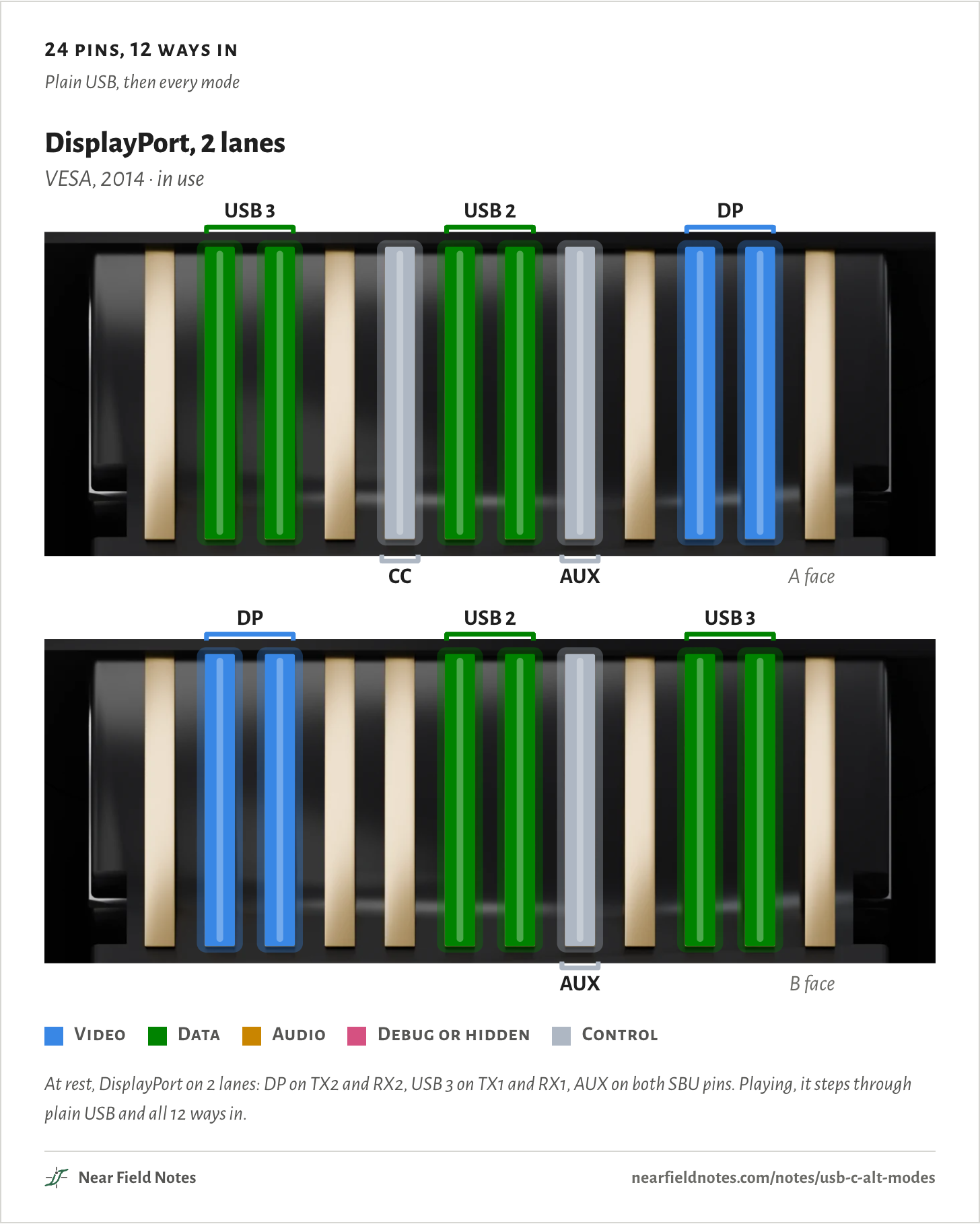
The figure lights the pins each mode takes, colored and named by what they carry. Plain USB uses two of the four fast pairs and the USB 2 pins. That leaves two pairs and the two sideband pins free for something else.
24 pins, 12 ways in
Plain USB, then every mode
Video
Data
Audio
Debug or hidden
Control
At rest, DisplayPort on 2 lanes: DP on TX2 and RX2, USB 3 on TX1 and RX1, AUX on both SBU pins. Playing, it steps through plain USB and all 12 ways in.
The USB-C receptacle
24 pins, either way up
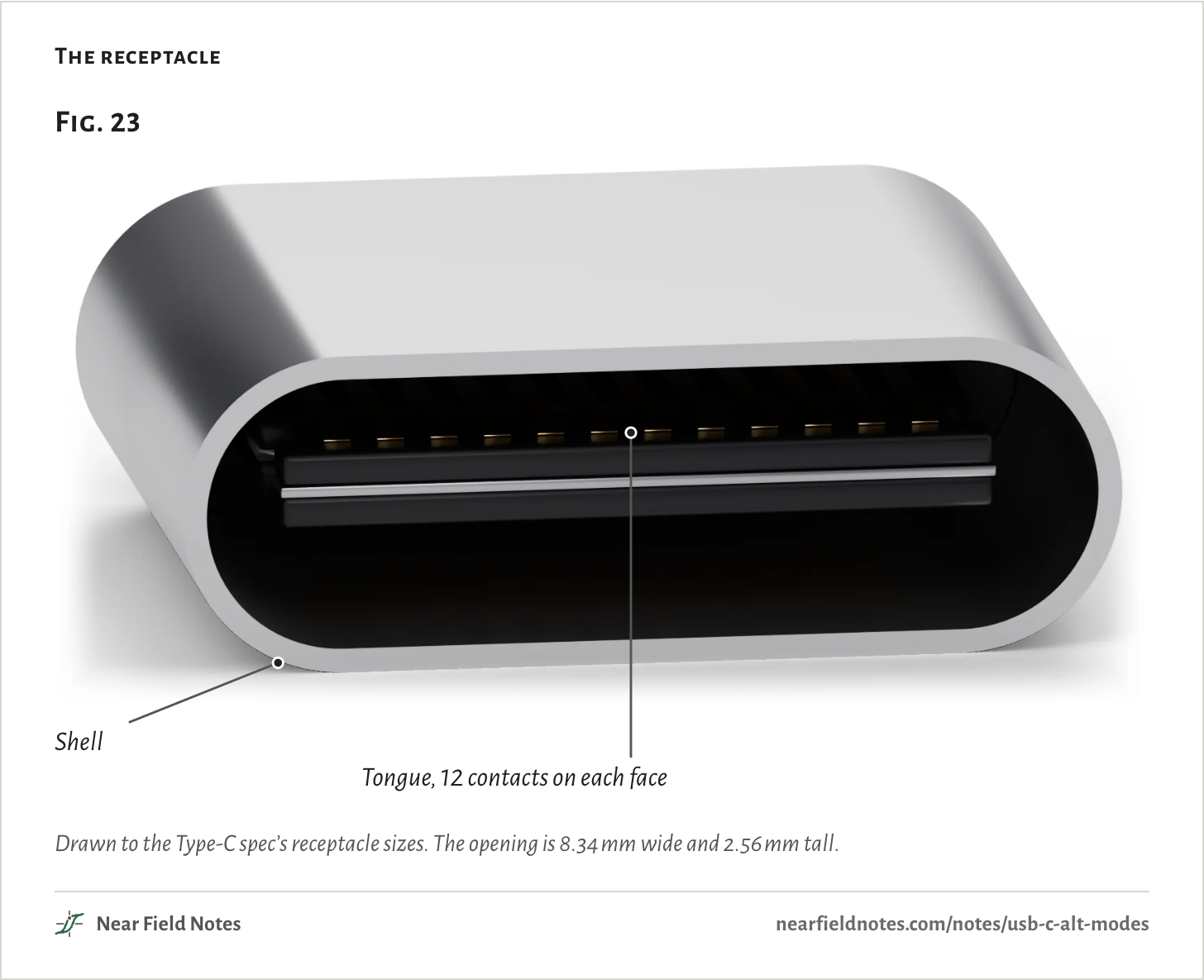
A USB-C receptacle is a steel shell around a thin tongue, with 12 contacts on each face. The two faces mirror each other, so a plug fits either way up and finds the same kind of pin in each place. Note 2 asks how the shell should meet ground.
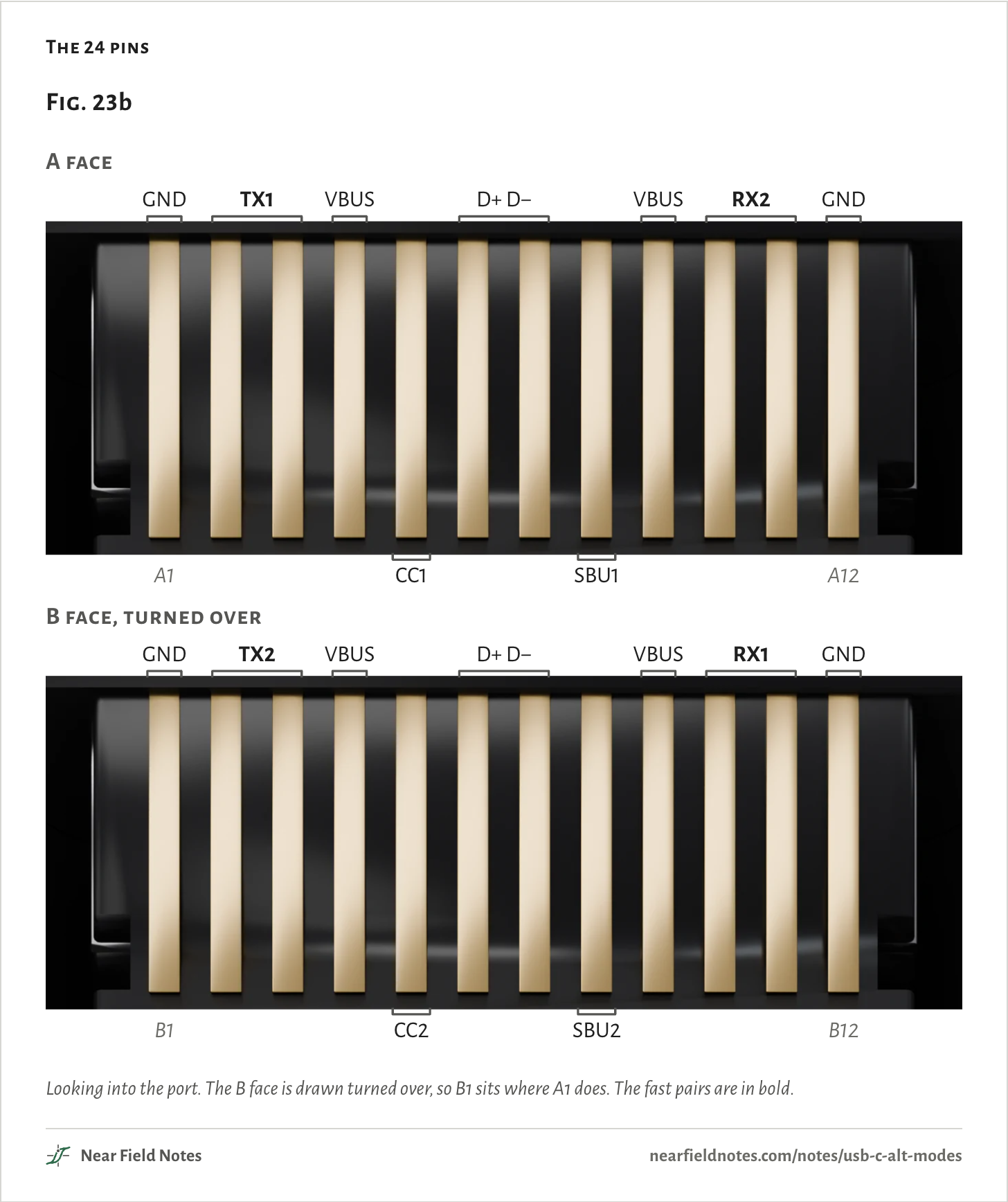
Four pins carry ground and four carry power, VBUS. Four more carry USB 2, D+ and D− on each face. The other 12 are four fast pairs, two CC pins and two sideband pins, and they are what an alt mode borrows.
The receptacle
Drawn to the Type-C spec’s receptacle sizes. The opening is 8.34 mm wide and 2.56 mm tall.
The fast pairs are the SuperSpeed pairs: TX1 and RX2 on the A face, TX2 and RX1 on the B face. Plain USB 3 uses one TX and one RX pair. A plug the usual way up gets TX1 and RX1, and turned over, TX2 and RX2.
CC1 and CC2 are the configuration channel. The plug’s CC wire meets one of them, and which one tells the port how the plug went in. SBU1 and SBU2, the sideband use pins, carry nothing in plain USB.
The 24 pins
Looking into the port. The B face is drawn turned over, so B1 sits where A1 does. The fast pairs are in bold.The table
The pin in each place, counted from the left as you look into the port.
Place
A face
B face, turned over
1
GND
GND
2
TX1+
TX2+
3
TX1-
TX2-
4
VBUS
VBUS
5
CC1
CC2
6
D+
D+
7
D-
D-
8
SBU1
SBU2
9
VBUS
VBUS
10
RX2-
RX1-
11
RX2+
RX1+
12
GND
GND
Agreeing on a mode
Messages on CC
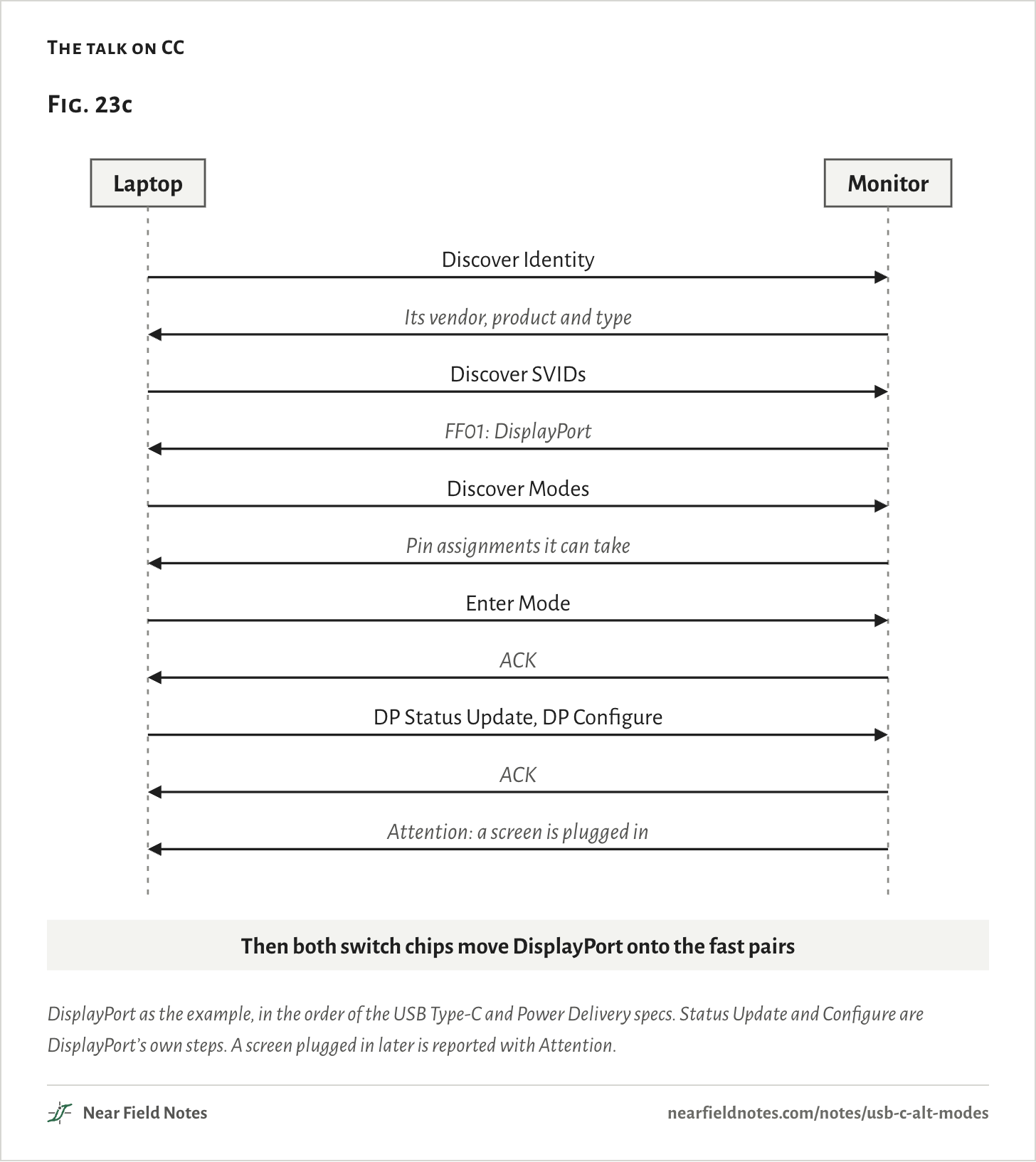
No pin changes job until both ends agree. The laptop, as the host, asks over CC in USB Power Delivery’s structured vendor-defined messages, or VDMs. It asks who the other end is, which modes it knows, and then enters one.
Each mode is named by a 16-bit ID, an SVID. DisplayPort’s is FF01. Only the host may send Enter Mode, and only after the discovery steps are done.
The talk on CC
DisplayPort as the example, in the order of the USB Type-C and Power Delivery specs. Status Update and Configure are DisplayPort’s own steps. A screen plugged in later is reported with Attention.The table
In order, on the CC wire.
From
Message
Laptop
Discover Identity
Monitor
Its vendor, product and type
Laptop
Discover SVIDs
Monitor
FF01: DisplayPort
Laptop
Discover Modes
Monitor
Pin assignments it can take
Laptop
Enter Mode
Monitor
ACK
Laptop
DP Status Update, DP Configure
Monitor
ACK
Monitor
Attention: a screen is plugged in
The switch chip
Which pairs go where
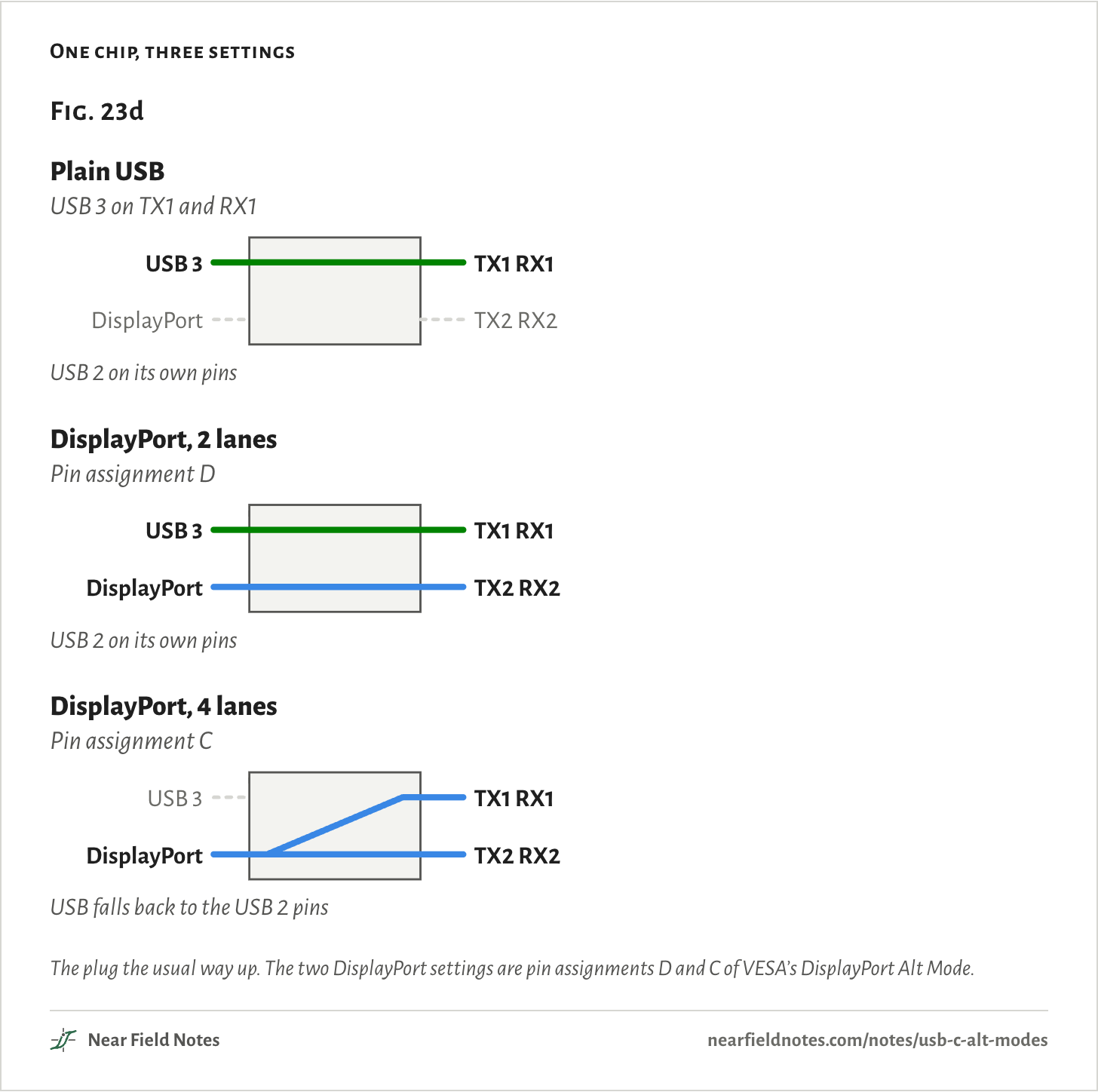
Once a mode is entered, a switch chip behind the receptacle routes each fast pair to the right controller. TI’s HD3SS460 is one. Its AMSEL pin picks 2 lanes of video beside USB 3, or all 4 lanes of video. Its POL pin undoes a plug turned over, and it switches the SBU pins too.
USB 2 has pins of its own, so in most modes it keeps working whatever the fast pairs carry.
One chip, three settings
The plug the usual way up. The two DisplayPort settings are pin assignments D and C of VESA’s DisplayPort Alt Mode.The table
Setting
Name
TX1 RX1
TX2 RX2
USB
Plain USB
USB 3 on TX1 and RX1
USB 3
Not taken
USB 2 on its own pins
DisplayPort, 2 lanes
Pin assignment D
USB 3
DisplayPort
USB 2 on its own pins
DisplayPort, 4 lanes
Pin assignment C
DisplayPort
DisplayPort
USB falls back to the USB 2 pins
DisplayPort
VESA, September 2014
VESA published DisplayPort Alt Mode in September 2014, and it is the most widely used video alt mode. Its choice between 2 and 4 lanes decides what is left for USB. Note 14 follows DisplayPort onto other kinds of wire.
What each setting carries
Video
USB
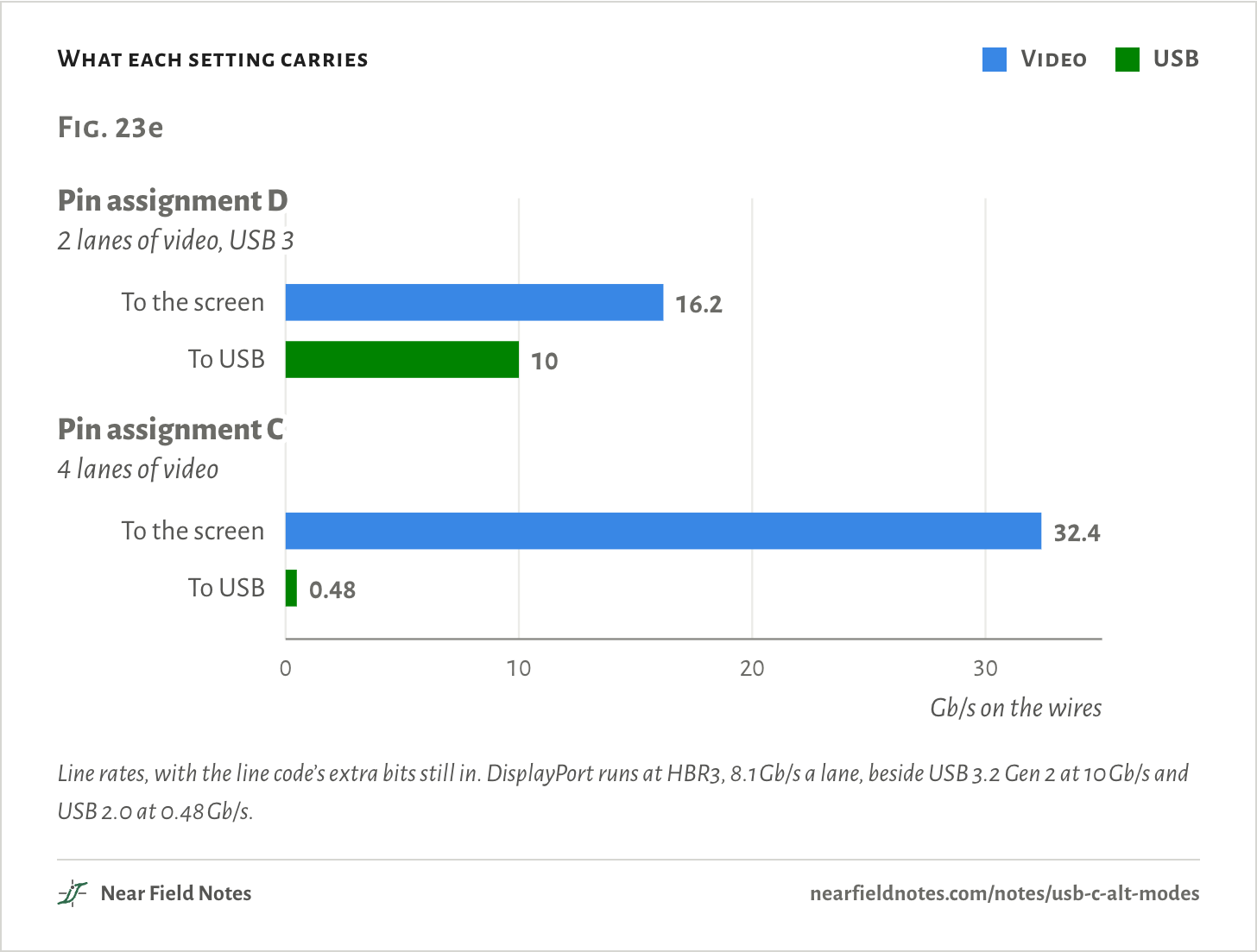
Line rates, with the line code’s extra bits still in. DisplayPort runs at HBR3, 8.1 Gb/s a lane, beside USB 3.2 Gen 2 at 10 Gb/s and USB 2.0 at 0.48 Gb/s.The table
Line rates of DisplayPort at HBR3, USB 3.2 Gen 2 and USB 2.0.
Setting
To the screen
To USB
Pin assignment D
16.2 Gb/s
10 Gb/s
Pin assignment C
32.4 Gb/s
0.48 Gb/s
446
DisplayPort Alt Mode
4 lanes leave USB only USB 2
Field marks. The host names FF01, then a pin assignment. Assignment D puts DisplayPort on TX2 and RX2 and keeps USB 3 on the other two pairs. Assignment C puts it on all four. Either way the AUX channel moves to the SBU pins, and the hot-plug signal comes as an Attention message on CC.
Look-alike. A faulty dock. When a screen takes all four lanes, the dock’s USB ports fall to USB 2 speed, as assignment C intends.
Range. Assignment E is the 4-lane setting for adapters that end in a DisplayPort plug. Assignments A, B and F were deprecated in version 1.0b of the spec. The lanes run at whatever DisplayPort rate both ends support.
Habitat. USB-C monitors, docks, and adapters to DisplayPort or HDMI. Google’s own adapters, Hoho for HDMI and Dingdong for DisplayPort, ran Chromium’s EC firmware.
447
Thunderbolt and USB4
One link, three kinds of traffic
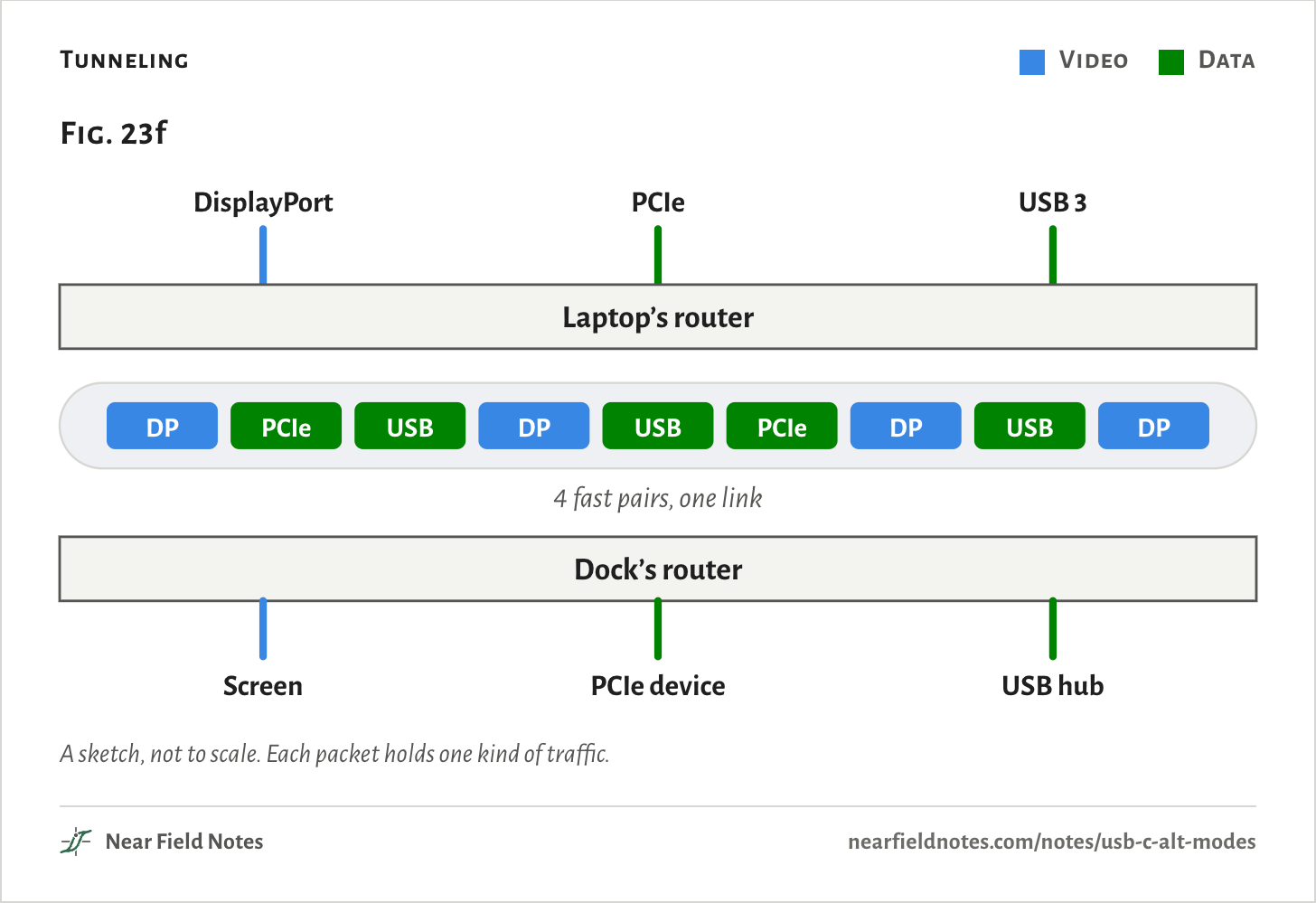
Thunderbolt 3 and USB4 take all four fast pairs as one link. A router at each end cuts DisplayPort, PCIe and USB into packets, sends them mixed and sorts them out again, so no pair belongs to any one of them.
Tunneling
Video
Data
A sketch, not to scale. Each packet holds one kind of traffic.448
Thunderbolt 3 and USB4
One link on all four pairs
Field marks. All four fast pairs run as one link. The SBU pins carry a slow sideband channel beside it, SBTX on SBU1 and SBRX on SBU2 in USB4, the same channel Thunderbolt 3 uses.
Look-alike. USB4 as one more alt mode. The host enters it with a Power Delivery message of its own, Enter_USB. Thunderbolt 3 goes the alt-mode way, with Enter Mode under Intel’s ID, 8087.
Range. Intel showed Thunderbolt 3 at Computex in June 2015, running at 40 Gb/s over USB-C. USB4, published in 2019, is built on Thunderbolt’s protocol.
Habitat. Laptops and docks that run screens, PCIe devices and USB over one cable.
449
The graveyard
MHL, HDMI and VirtualLink
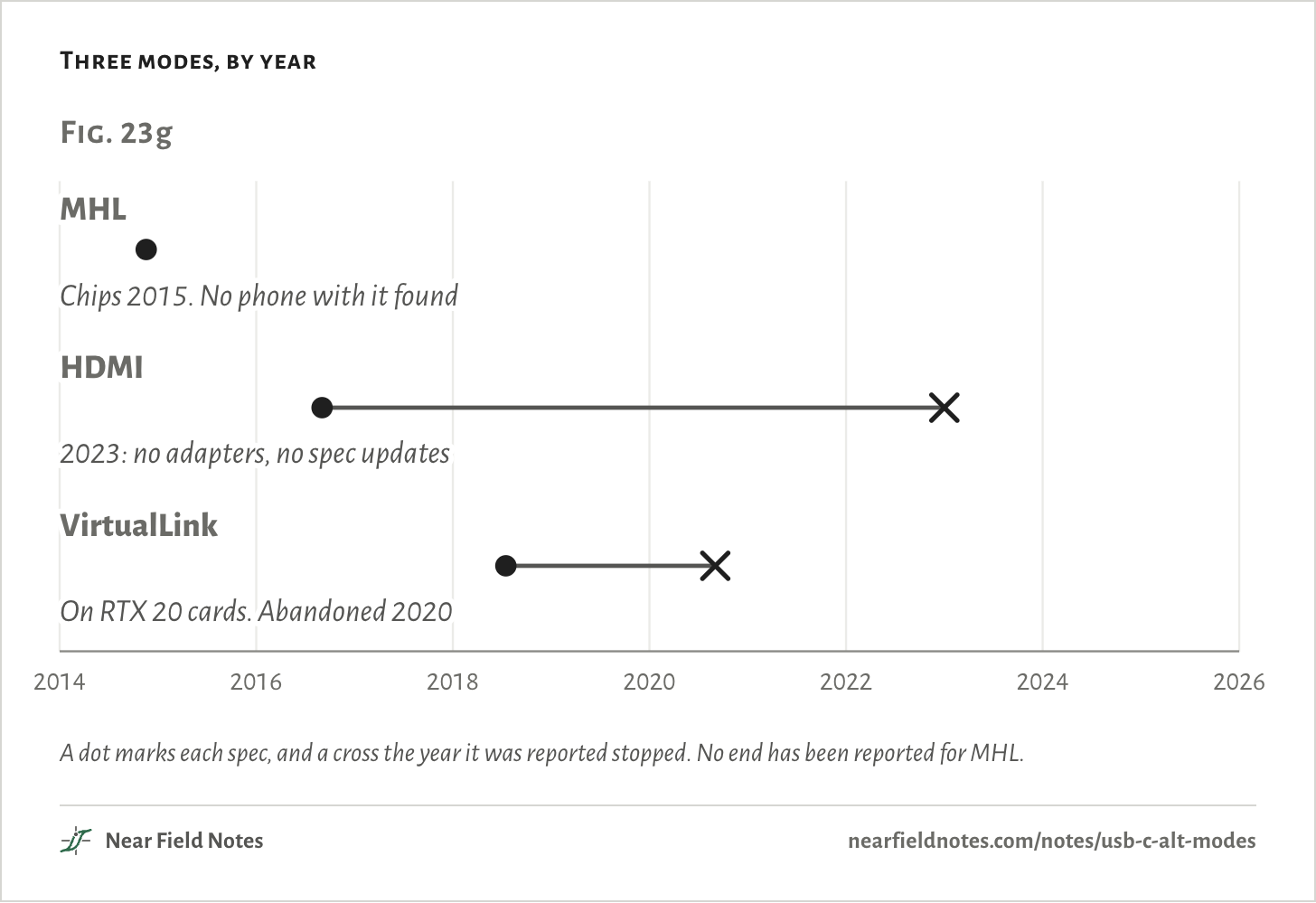
Three more alt modes got specs and never caught on. HDMI’s backers said in 2023 they would not update theirs, and VirtualLink’s group had gone quiet by 2020. No phone is known to have shipped with MHL Alt Mode.
Three modes, by year
A dot marks each spec, and a cross the year it was reported stopped. No end has been reported for MHL.450
HDMI Alt Mode and MHL
No HDMI adapters by 2023
Field marks. HDMI Alt Mode carried HDMI 1.4b, with CEC, the Ethernet channel and audio return. Its three data pairs and its clock ran on the four fast pairs, its HEAC lines on the SBU pins and CEC on CC. USB 2 kept its own pins.
Look-alike. A USB-C to HDMI adapter. It takes DisplayPort Alt Mode and converts the signal to HDMI inside, so it needs a port with DisplayPort.
Range. The spec stopped at HDMI 1.4b. In January 2023 HDMI’s licensing body said it knew of no adapter ever made and would not update the spec.
Habitat. MHL Alt Mode was announced in November 2014, for phones, and Silicon Image announced chips for it in March 2015. That month no phone had a USB-C port yet. No phone that shipped with MHL Alt Mode has been found.
451
VirtualLink
One cable for a VR headset
VirtualLink, from July 2018, put a VR headset on one cable: four lanes of DisplayPort at HBR3, USB 3.1 Gen 2 at 10 Gb/s, and up to 27 W of power. NVIDIA, Oculus, Valve, AMD and Microsoft led it.
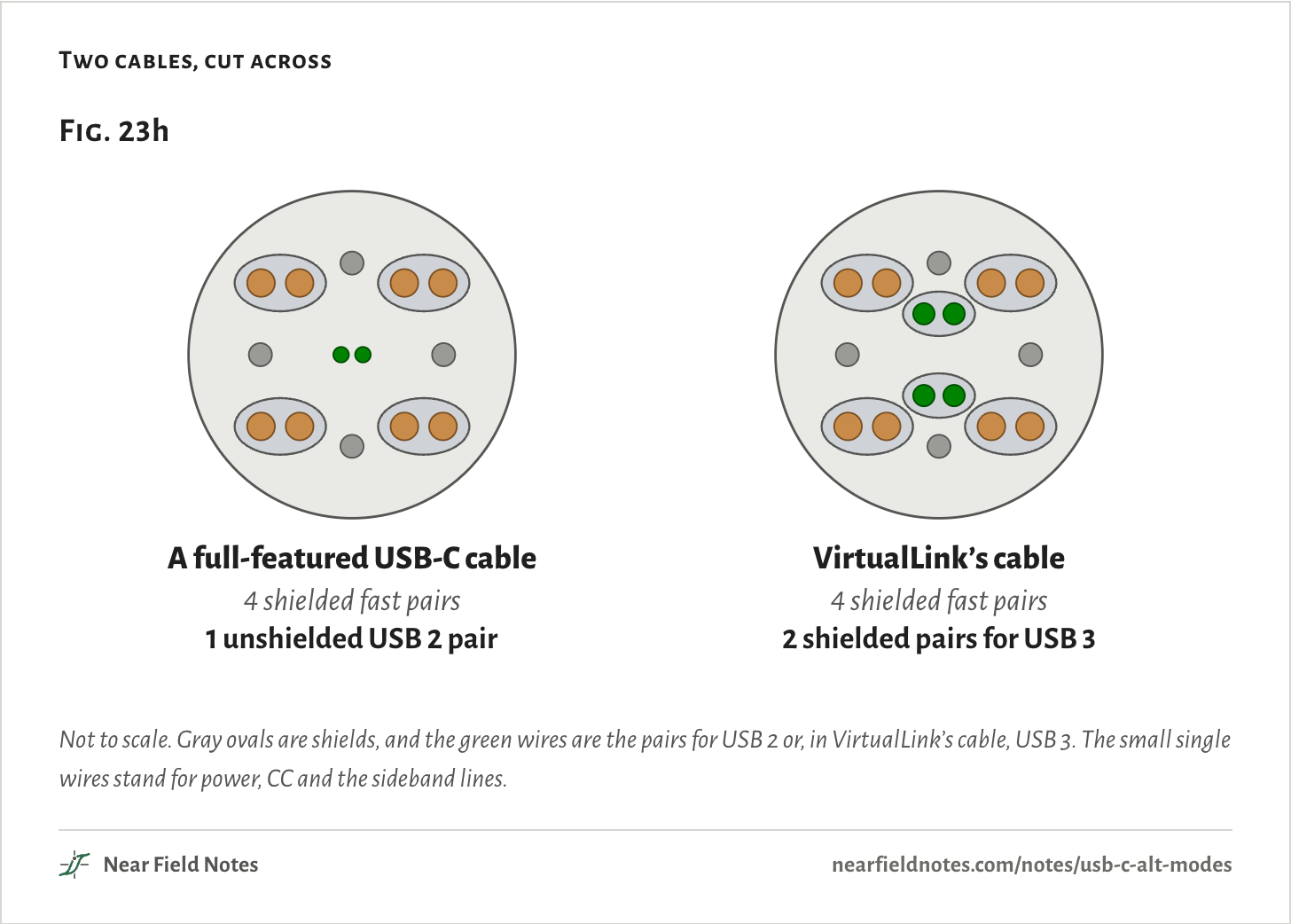
With every fast pair carrying video, it moved USB 3 onto the four USB 2 pins: A6 and A7 as one pair, B6 and B7 as the other. A USB-C cable has one unshielded pair for USB 2, so VirtualLink needed a cable with two shielded ones.
NVIDIA’s RTX 20 Founders Edition cards had the port, and their Super versions kept it. The RTX 30 cards dropped it. StarVR and XTAL headsets used it. Valve canceled its Index adapter, and in September 2020 Road to VR reported that the group behind it had not been active for some time. Its ID on CC was NVIDIA’s own, 0955.
Two cables, cut across
Not to scale. Gray ovals are shields, and the green wires are the pairs for USB 2 or, in VirtualLink’s cable, USB 3. The small single wires stand for power, CC and the sideband lines.
By resistor alone
Accessory modes
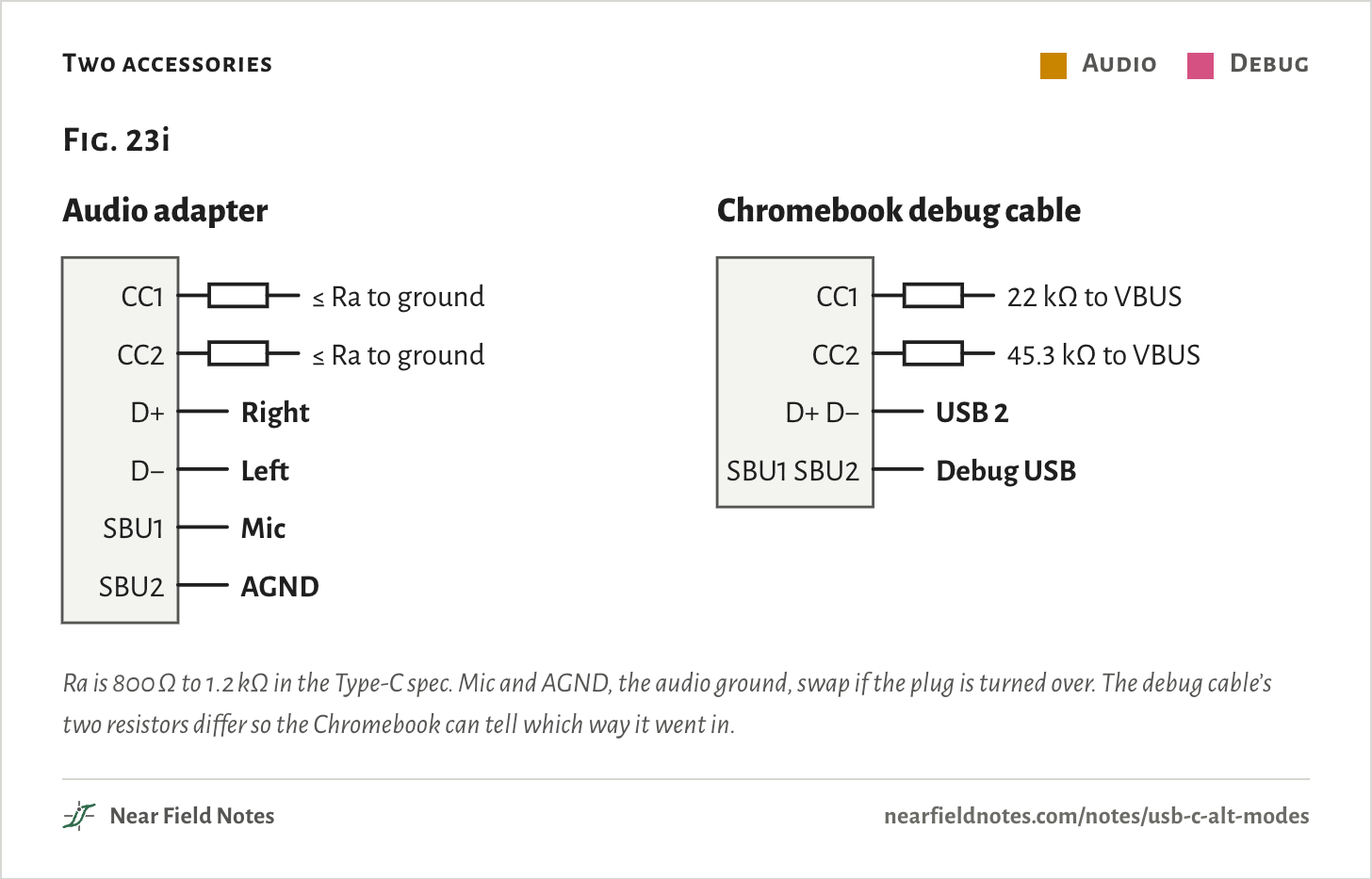
Two accessories need no messages. A device normally pulls one CC pin down through Rd, 5.1 kΩ. These tie both CC pins the same way, and the port reads that pattern as the mode.
Two accessories
Audio
Debug
Ra is 800 Ω to 1.2 kΩ in the Type-C spec. Mic and AGND, the audio ground, swap if the plug is turned over. The debug cable’s two resistors differ so the Chromebook can tell which way it went in.The table
Accessory
Pins
Audio adapter
CC1: ≤ Ra to ground, CC2: ≤ Ra to ground, D+: Right, D−: Left, SBU1: Mic, SBU2: AGND
Chromebook debug cable
CC1: 22 kΩ to VBUS, CC2: 45.3 kΩ to VBUS, D+ D−: USB 2, SBU1 SBU2: Debug USB
452
Accessory modes
Set by the resistors on CC
Field marks. An audio adapter ties both CC pins to ground through Ra or less. The port then sends right audio on D+ and left on D−, and uses the SBU pins for the microphone and the audio ground. A debug accessory shows Rp on both CC pins, or Rd on both.
Look-alike. A passive headphone adapter that works in any USB-C port. It works only where the port supports Audio Adapter Accessory Mode, which release 2.3 of the Type-C spec deprecated in October 2023.
Range. Release 2.3 put a Liquid Corrosion Mitigation Mode in the audio mode’s place. Release 2.2 still listed the audio adapter’s pins as Fig. 23i draws them.
Habitat. Chromebooks. Their debug cable, SuzyQ, holds a two-port hub: one port on D+ and D−, the other on the SBU pins, where the security chip puts its own USB link. That blocks DisplayPort, which needs the SBU pins too.
453
Hidden modes
Vendors’ own IDs
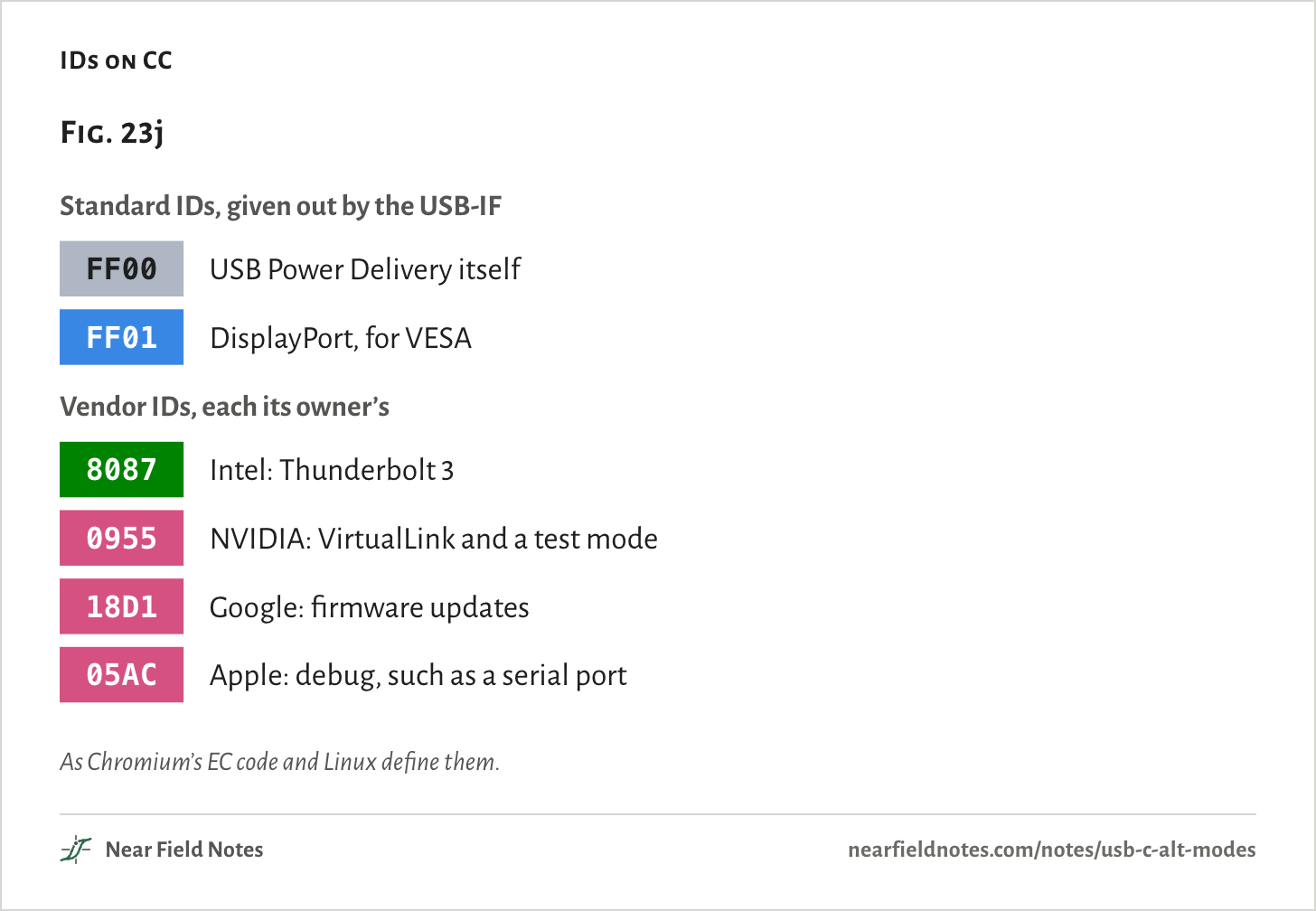
A company can run modes under its own USB vendor ID and define them as it likes. What is public about them comes from open-source code and outside research.
IDs on CC
As Chromium’s EC code and Linux define them.The table
ID
Kind
What it names
FF00
Standard IDs
USB Power Delivery itself
FF01
Standard IDs
DisplayPort, for VESA
8087
Vendor IDs
Intel: Thunderbolt 3
0955
Vendor IDs
NVIDIA: VirtualLink and a test mode
18D1
Vendor IDs
Google: firmware updates
05AC
Vendor IDs
Apple: debug, such as a serial port
454
Vendor modes
Four companies’ own modes
Field marks. Apple’s message 306 is a debug serial port at 1.2 V, on the D+ and D− pins of either face or on the SBU pins, as Asahi Linux documents for M1 Macs. A 2024 Black Hat talk found Apple’s debug messages in the iPhone 15’s USB-C chip too. Google’s 18D1 has a firmware update mode, and NVIDIA’s 0955 carries VirtualLink and a test mode.
Look-alike. Any dock that works with a laptop’s DisplayPort. Before video, a Switch 2 and Nintendo’s dock trade more than 30 vendor messages, and most third-party docks get no picture.
Range. The Switch 2’s messages are unstructured, outside the Discover and Enter steps of Fig. 23c. Video then comes over DisplayPort Alt Mode.
Habitat. Service benches, firmware updates, and a maker’s own docks and adapters.
455
USB-C priority
A monitor’s menu
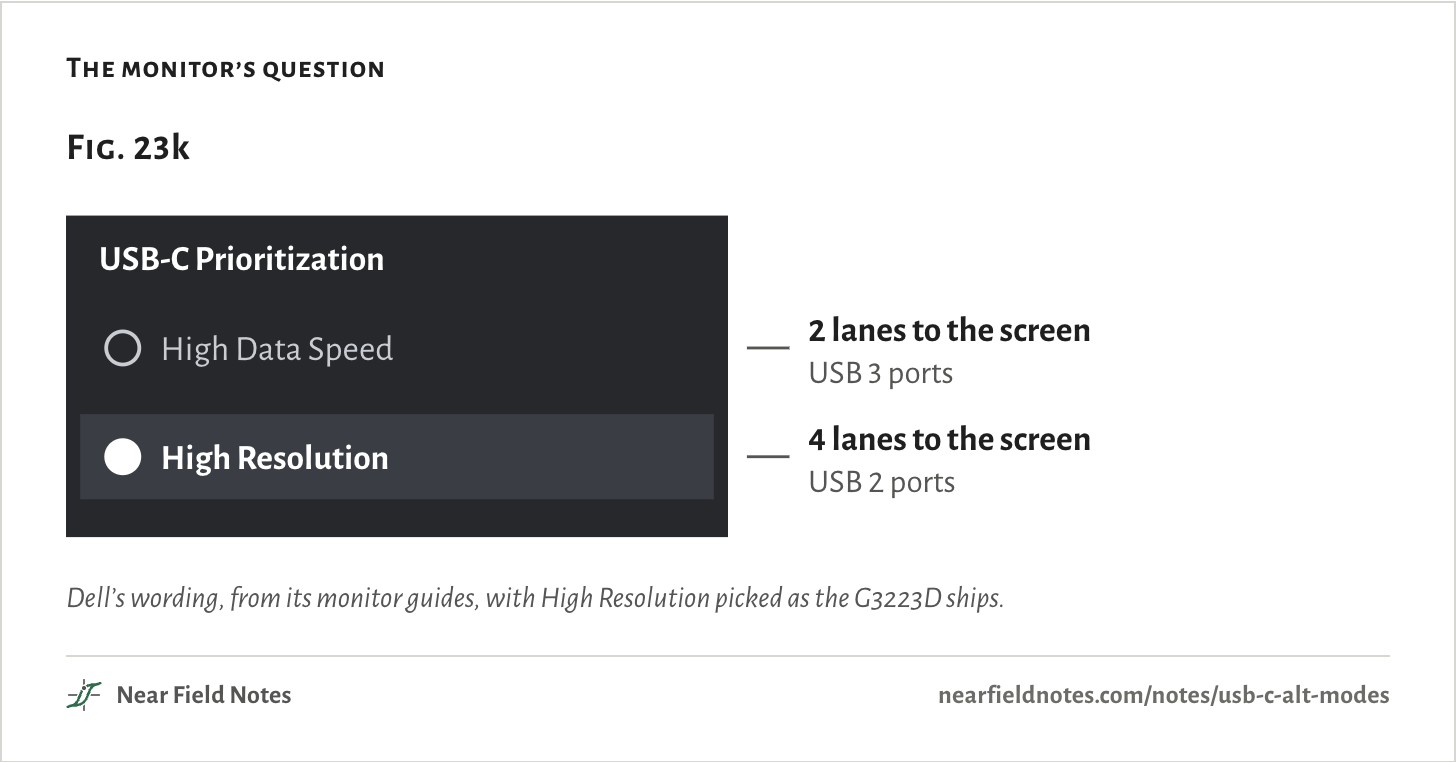
A monitor with a USB-C input and a USB hub inside has to make DisplayPort’s choice, so it asks you. Dell’s manuals call it USB-C Prioritization, with a choice of High Resolution or High Data Speed.
Dell’s G3223D guide spells it out. High Resolution, the default, sends 4 lanes at HBR3 and cuts the monitor’s USB to USB 2.0. High Data Speed sends 2, which leaves the other two pairs for USB 3, as in Fig. 23d.
The monitor’s question
Dell’s wording, from its monitor guides, with High Resolution picked as the G3223D ships.The table
Choice
To the screen
The monitor’s USB ports
High Data Speed
2 lanes to the screen
USB 3 ports
High Resolution
4 lanes to the screen
USB 2 ports
All 12 side by side
Every mode’s pins
Here is every mode by the pins it takes. In this chart only VirtualLink and analog audio put something other than USB 2 on the USB 2 pins. Apple’s serial port can also use D+ and D− in place of the SBU pins.
Google’s and NVIDIA’s modes are drawn on CC alone, because their sources name no other pins. The Switch 2 shows only the pins every DisplayPort setting shares.
Every mode’s pins
Video
Data
Audio
Debug or hidden
Control
Each mode as two rows of 12 squares, the A face over the B face turned over, with the plug the usual way up. DisplayPort is shown at both settings, so 14 rows hold plain USB and the 12.The table
Each mode’s pins, in words. Plain USB is shown plugged in the usual way up.
Mode
Fast pairs
USB 2 pins
SBU pins
CC
Status
Plain USB
USB 3 on TX1 and RX1
USB 2
Not taken
CC
The default
DisplayPort, 2 lanes
DP, USB 3
USB 2
AUX
CC
VESA, 2014 · in use
DisplayPort, 4 lanes
DP
USB 2
AUX
CC
VESA, 2014 · in use
Thunderbolt 3
TB3
USB 2
Sideband
CC
Intel, 2015 · in use
USB4
USB4
USB 2
Sideband
CC
USB-IF, 2019 · in use
MHL
MHL on 1, 2 or 4 pairs. Drawn on 2, with USB 3
USB 2
Not taken
CC
MHL, 2014 · no phone found
HDMI
HDMI
USB 2
HEAC
CC
HDMI, 2016 · no adapters by 2023
VirtualLink
DP
USB 3
AUX
CC
2018 · abandoned 2020
Analog audio
Not taken
right, left
Mic / AGND
To ground
Deprecated in 2023
Chromebook debug
Not taken
USB 2
Debug USB
Pulled up
Google’s debug cable
Apple
Not taken
USB 2, or the serial port in place of SBU
Serial
05AC
Apple’s debug messages
Google
Not taken
Not taken
Not taken
18D1
Google’s firmware updates
NVIDIA
Not taken
Not taken
Not taken
0955
NVIDIA’s test mode
Switch 2
DP on TX2 and RX2. TX1 and RX1 not published
Not taken
AUX
30+ messages
Nintendo, 2025
Which mode is this?
From the CC pins up
A port’s CC pins, and the messages on them, say which mode it is in. The key reads them in order.
Key to USB-C modes
Which mode is this port in?
1aBoth CC pins are tied the same way, by resistors aloneGo to 2
1bOnly one CC pin is pulled down, through RdGo to 3
2aBoth go to ground through Ra or lessAnalog audio
2bBoth have Rp, or both have RdA debug accessory, such as a Chromebook’s cable
3aNo mode is entered, or no messages pass at allPlain USB
3bIt sends Enter_USBUSB4
3cIt sends Enter Mode with an IDGo to 4
4aFF01DisplayPort, 2 or 4 lanes
4b8087, Intel’sThunderbolt 3
4c0955, NVIDIA’sVirtualLink, or NVIDIA’s test mode
4d05AC or 18D1Apple’s or Google’s own modes
MHL’s and HDMI’s IDs aren’t in the sources here. A Switch 2 and its dock trade their unstructured messages before step 4.
Pick a mode yourself
Plain USB and all 12
Pick a mode to light its pins on both faces. The readings say what asks for it, what it puts on the fast pairs and the SBU pins, and where it stands now.
Default
In use
The graveyard
By resistor alone
Hidden
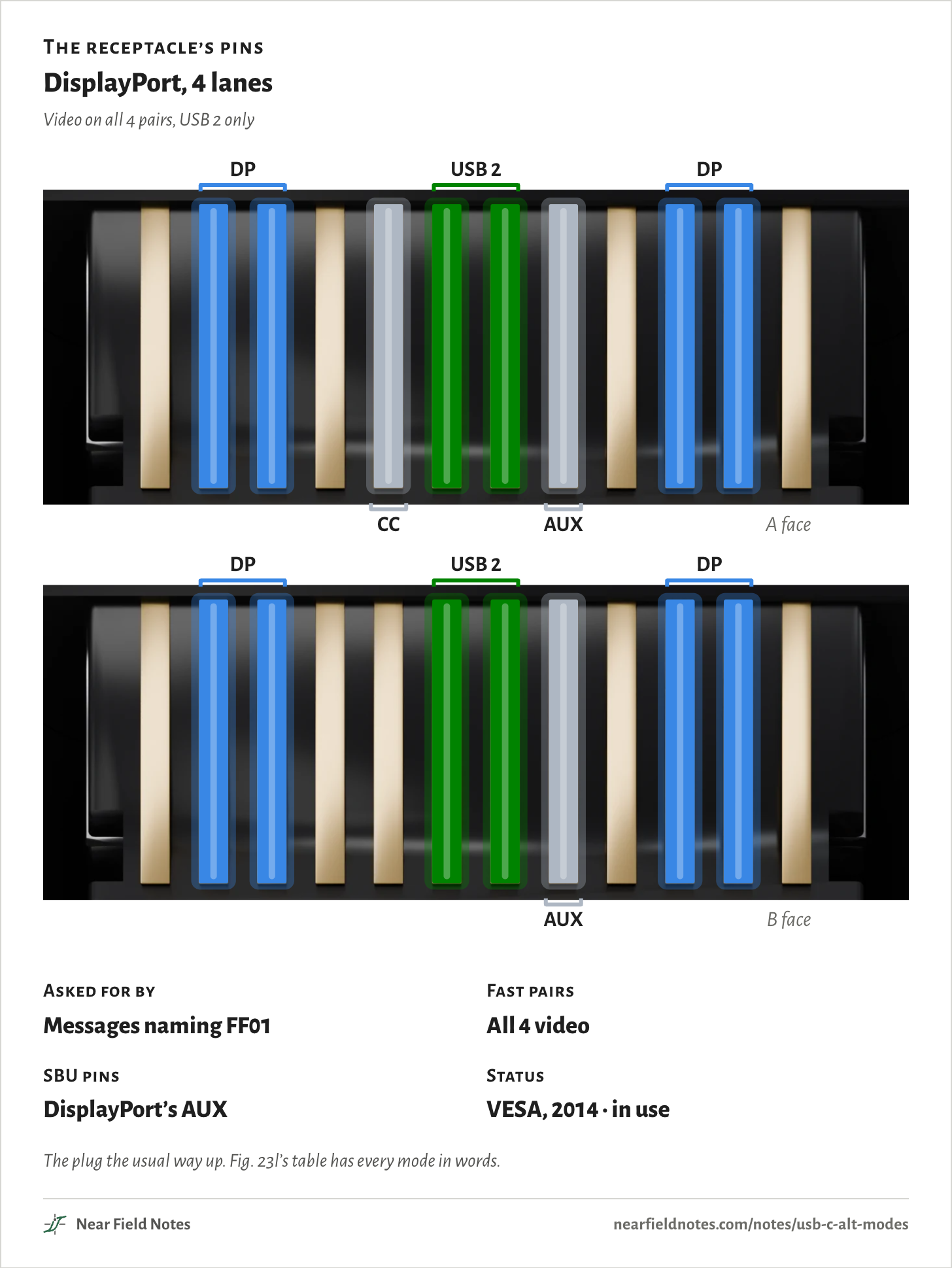
The receptacle’s pins
DisplayPort, 4 lanes
Video on all 4 pairs, USB 2 only
Asked for by
Messages naming FF01
Fast pairs
All 4 video
SBU pins
DisplayPort’s AUX
Status
VESA, 2014 · in use
The plug the usual way up. Fig. 23l’s table has every mode in words.
Conditions
Method
Read from specs, datasheets, open-source code and published research, listed under Sources.
Pins
The receptacle’s pinout from release 2.3 of the USB Type-C spec. Each mode’s pins from the sources that describe it.
Plug
Every figure shows the plug the usual way up, its CC wire on CC1. Turned over, the same jobs move to the other face.
Plain USB
Drawn as one lane, TX1 and RX1. USB 3.2’s two-lane rates, Gen 1x2 and Gen 2x2, use all four pairs.
Rates
Line rates as each spec gives them: DisplayPort HBR3, USB 3.2 Gen 2 and USB 2.0.
Count
12 ways: DisplayPort, Thunderbolt 3, USB4, MHL, HDMI, VirtualLink, analog audio, the Chromebook debug cable, and Apple’s, Google’s, NVIDIA’s and Nintendo’s modes. DisplayPort counts once, with two settings.
Renders
Blender, one receptacle built to the Type-C spec’s sizes.
From specs and public documents only. Nothing here was measured or simulated.
Limits
MHL’s and HDMI’s IDs on CC aren’t in the sources here, so the key leaves them out.
Nintendo hasn’t published how many lanes the Switch 2 uses after its handshake. Only the pins every DisplayPort setting shares are lit.
Vendor modes are known only as far as open code and outside research show them. There may be more.
An Ethernet alt mode was suggested on an IEEE 802.3 list in 2015 and never adopted, so it isn’t counted.
The lane counts behind Dell’s menu come from one guide, the G3223D’s.
Files
anim/modes.pyEvery mode’s pins, with a source for each
render/port_site.pyThe renders in Fig. 23 and on the faces
refs/research.mdThe research notes behind the sources